
ABC ID Update
Does your ABC ID display incorrect information? For example, name, date of birth, gender. If so, it likely means there are errors in your Aadhaar card. Before you update your ID you need to first update your Aadhaar card.
How to Update Information on ABC ID
- Firstly, update your Aadhaar card either by visiting the nearest possible Aadhaar center or by visiting the official Uidai website.
- Once the details on your Aadhaar card are updated, you can then update your ID.
- Go to the Digilocker portal and log in to your account.
- Navigate to the “Issued Documents” section, and refresh the page. (since your ID is created on your Aadhaar card credentials), once the information on the Aadhaar card is updated the information on your ID will be updated automatically.
- If the details are not updated, try refreshing the page after some time.
- Your issue should be resolved shortly.
How to Update university in ABC ID?
To update the university or any other information in your ID, you first need to delete the existing ID and then create a new one with the correct information. Don’t worry, your ID number will remain the same.
How to Delete the ABC ID?
To delete the existing ID, follow some easy steps:
- Login DigiLocker portal.
- Navigate to the “Issued Documents” tab, and click on it.

- Wait for the ID to load.

- Click on three dots, here you will find an option to delete it.
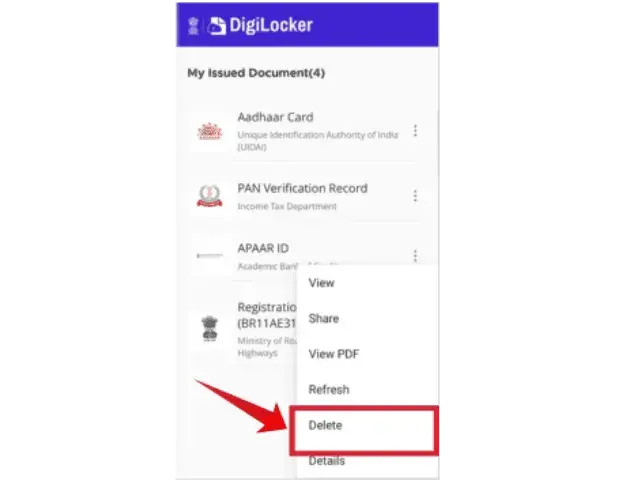
- Once the ID is deleted you can create a new one.
FAQs